Day 2 - Finding neighbours
[4]:
import pandas as pd
import numpy as np
from matplotlib import pyplot as plt
from time import time
Reading the lens/source catalog
[5]:
!head -n 5 /home/idies/workspace/Storage/divyar/IAGRG_2022/DataStore/demo_objects.csv

# !wc -l /home/idies/workspace/Storage/divyar/IAGRG_2022/DataStore/demo_objects.csv
ra,dec,z,col_3,col_4,col_5
30.611734783139795,-6.3569091978972425,23.901826,23.043298,22.649281,0.5
30.61078116389429,-6.350381359287763,22.385773,21.548382,21.272576,0.38
30.596477830319948,-6.3461523588063935,23.948118,23.121471,22.773187,0.37
30.592680083175416,-6.3445214768250775,23.42731400000001,22.022285999999998,21.334948,0.45
[6]:
#reading lens file

#tries to read everthing in the file
path="/home/idies/workspace/Storage/divyar/IAGRG_2022/DataStore/demo_objects.csv"

df = pd.read_csv(path, sep=',')
# a brief look of what dataFrame has for us-
Data from - HSC survey
ra,dec - coordinates in units of degrees.
z - photometric redshifts of the objects.
col_1,col_2,col_3 - extra columns which have to be ignored
[7]:
df.head()
[7]:
| ra | dec | z | col_3 | col_4 | col_5 | |
|---|---|---|---|---|---|---|
| 0 | 30.611735 | -6.356909 | 23.901826 | 23.043298 | 22.649281 | 0.50 |
| 1 | 30.610781 | -6.350381 | 22.385773 | 21.548382 | 21.272576 | 0.38 |
| 2 | 30.596478 | -6.346152 | 23.948118 | 23.121471 | 22.773187 | 0.37 |
| 3 | 30.592680 | -6.344521 | 23.427314 | 22.022286 | 21.334948 | 0.45 |
| 4 | 30.601111 | -6.338650 | 21.660045 | 20.812223 | 20.383688 | 0.32 |
# select required columns only
[8]:
df = pd.read_csv(path, sep=',', usecols=[0,1,2])
[9]:
df.head()
[9]:
| ra | dec | z | |
|---|---|---|---|
| 0 | 30.611735 | -6.356909 | 23.901826 |
| 1 | 30.610781 | -6.350381 | 22.385773 |
| 2 | 30.596478 | -6.346152 | 23.948118 |
| 3 | 30.592680 | -6.344521 | 23.427314 |
| 4 | 30.601111 | -6.338650 | 21.660045 |
Visualising the coordinate space of input data
Exercise:
write a python code to plot dec (on Y-axis) vs ra (on X-axis) of the objects passed in the dataFrame.
This plot will look very dense, so in order to visually see the points distributed on the (ra,dec) plane, downsample the number of points by 100 and again plot.
In order to downsample the points, use
numpy.random.choise()function.
[10]:
# Using numpy.random.choise() to randomly pick up points
# and hence reduce the density of points

Number_of_points = df.ra.size
down_sample_by = 100
random_indices = np.random.choice(np.arange(Number_of_points),
                                  size=int(Number_of_points/down_sample_by),
                                  replace=False)

print("Number of points before down sampling = ", Number_of_points)
print(f"Number of points after down sampling by {down_sample_by} = ", random_indices.size)
print()
print("randomly picked indices:\n",random_indices)
Number of points before down sampling =  220622
Number of points after down sampling by 100 =  2206

randomly picked indices:
 [ 77470 149688  79224 ...  44467  39179  90845]
Your plot should look something like

On-sky distance between two points on the surface of a unit sphere
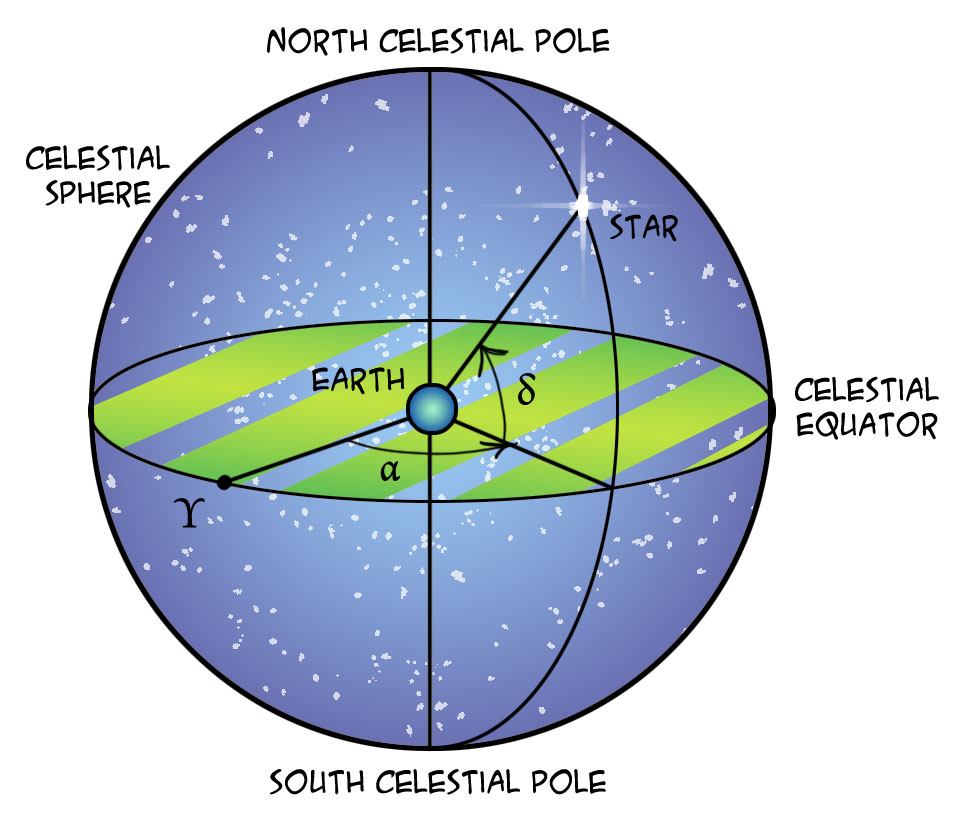
\(\vec{r_i} = r_i(\sin\theta \cos\phi \ \hat{x}+ \sin\theta \sin\phi \ \hat{y} + \cos\theta \ \hat{z})\), \(\hspace{0.5cm}\)for \(\mathrm{i \in (1,2)}\).
\(\cos(\theta)=\frac{\vec{r_1}\cdot\vec{r_2}}{r_1 r_2}\)
set \(r_1=r_2=1\)
get \(\theta\)
Using: \(\mathrm{arc\_distance}=s=r \times \theta\), obtain the distance between the two ra,dec values.
Since \(r_1=r_2=1\),
\(\Rightarrow s=\theta\) (radians)
Exercise: Using the above formula
Implement a function which takes tuples of (ra,dec) of two objects and returns the distance between them on the Unit sphere.
Your code should return the result in units of arc seconds and NOT in radians.
[56]:
rad_to_arcsec = 180.0*3600./np.pi
arcsec_to_rad = 1/rad_to_arcsec

def dist_betw_two_obj(obj1,obj2):
    ra1,dec1 = obj1
    #complete this code
    return dist
# Running and testing the distance computation code:
# creating a list/array tuple of values from ra,dec of each object
[ ]:
coords = list( zip(df.ra.values,df.dec.values))
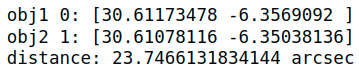
# print the (ra,dec) tuples of first two objects in the above list
# compute and print the distance between these two objects,
I get the following:
Brute force search for neighbour objects within a specified distance
time complexity ~ \(\mathcal{O}(n^2)\)
Exercise:
Write a function
find_neighbour_pointsthat uses (ra,dec) coordinates of an object, and within some givenrmaxdistance, finds its neighbour points in the given dataFrame catalog.Using this code you should be able to find neighbours of each object in the dataFrame - within the same dataFrame.
Say the \(1^{st}\) object in the dataFrame has 5 objects within say rmax=15 arcsec, then you should be able to print/store the
indicesanddistancesof these neighbours.
Write a function
query_neighbour_pointsthat can use (ra,dec) coordinates of one object or an list/array of objets, and within some givenrmaxdistance, finds its neighbour points in any other catalog.Using this code you should be able to access the coordinates of all the neighbours of each object that you are querying for. And hence you should be able to tell how far each neighbour is from the queried object.
[40]:
# Exercise (1) is solved here:

from collections import defaultdict

def find_neighbour_points(coords, rmax=10, verbose=True):
    """
    finding neighbour objects within some distance, for all the objects in a given array of coordinates.

    coords: an array/list of tuples (ra,dec)

    Returns:
    `nnids`: indices into `coords` of neighbours of each object in `coords` within `rmax`
    `distances`: distance of objects matched in `nnids"""

    # define containers for the distance and id information of matched objects
    distances = defaultdict(list)
    nnids = defaultdict(list)

    c=0
    for ii,obj1 in enumerate(coords):
        c+=1
        d=0
        for jj,obj2 in enumerate(coords):
            if jj==ii:
                continue
            d+=1
            dist = dist_betw_two_obj(obj1,obj2)
            if dist <= rmax:
                nnids[ii].append(jj)
                distances[ii].append(dist)
        if verbose:
            print(ii,nnids[ii],distances[ii])
    return nnids,distances

#try to build on the information/tricks you have to solve for exerise (2) given above.
def query_neighbour_points(coords1, coords2, rmax=10):
    """
    coords1: a tuple or an array/list of tuples (ra,dec)
    coords2: an array/list of tuples (ra,dec)

    Returns:
    `nnids`: indices into `coords2` of neighbours of each object `coords1` within `rmax`.
    `distances`: distance of objects matched in `nnids`"""

    # finish this code
    return nnids,distances
Testing the above brute force search functions
Exercise:
Using the first 50 objects in the catalog, Search for their neighbours within a ball of radius
rmax, say forrmax(default value)=15 arcsec.Note: We’re only using 50 points in order to reduce the compute time, but the code has no such limitation. If you run your code for a large number of points, it will take more time to finish that’s all.
Access the above result and print indices,distances and coordinates of the neighbours of few objects.
Then test out the function
query_neighbour_pointsfor the same objects you take above. The neighbour matches fromquery_neighbour_pointsandfind_neighbour_pointsmust match.
[37]:
print("object index, neighbours indices list, neighbours distances list ")

# from time import time
# t=time()
# nnids,distances = find_neighbour_points(coords[:100],rmax=15)
# print(f"total time taken to run = {time()-t}")


%time nnids,distances = find_neighbour_points(coords[:50],rmax=15)
object index, neighbours indices list, neighbours distances list
0 [] []
1 [] []
2 [3] [14.802299176580224]
3 [2] [14.802299176580224]
4 [36] [13.682331312465545]
5 [] []
6 [] []
7 [] []
8 [13] [9.465537930627812]
9 [10, 12, 38] [10.94680374083333, 5.876628853240463, 14.594679725290598]
10 [9, 12] [10.94680374083333, 10.280601486171243]
11 [42] [7.151725370768233]
12 [9, 10, 14] [5.876628853240463, 10.280601486171243, 11.314136132011965]
13 [8] [9.465537930627812]
14 [12, 15, 16] [11.314136132011965, 5.475958296970058, 11.765854084075805]
15 [14, 16, 44] [5.475958296970058, 13.47975484115049, 10.276694006812336]
16 [14, 15] [11.765854084075805, 13.47975484115049]
17 [46] [6.898087849306218]
18 [] []
19 [] []
20 [] []
21 [] []
22 [] []
23 [] []
24 [] []
25 [26] [13.29908354885402]
26 [25] [13.29908354885402]
27 [] []
28 [] []
29 [30] [3.6918325238285883]
30 [29] [3.6918325238285883]
31 [] []
32 [] []
33 [] []
34 [] []
35 [36] [10.896870606370635]
36 [4, 35] [13.682331312465545, 10.896870606370635]
37 [] []
38 [9, 40] [14.594679725290598, 14.719522078343205]
39 [40] [1.984703189527645]
40 [38, 39] [14.719522078343205, 1.984703189527645]
41 [] []
42 [11] [7.151725370768233]
43 [] []
44 [15] [10.276694006812336]
45 [] []
46 [17] [6.898087849306218]
47 [] []
48 [] []
49 [] []
CPU times: user 54.2 ms, sys: 4.6 ms, total: 58.8 ms
Wall time: 53.3 ms
[41]:
nth = 15
print(f"""Accessing the neighbour points for the {nth}th object using the output
of our brute force method:""")

print(f"neighbours: {nnids[nth]} \ndistances: {distances[nth]}")

print()

print(f"Accessing the neighbour coordinates of the {nth}th object:")
for ii in nnids[nth]:
    print(ii, coords[ii])
Accessing the neighbour points for the 15th object using the output
of our brute force method:
neighbours: [14, 16, 44]
distances: [5.475958296970058, 13.47975484115049, 10.276694006812336]

Accessing the neighbour coordinates of the 15th object:
14 (30.564297942270603, -6.322030429805476)
16 (30.56234780563957, -6.319398928221537)
44 (30.568297869918087, -6.3202347701814166)
A visual sanity check for execution of find_neighbour_points function
Exercise:
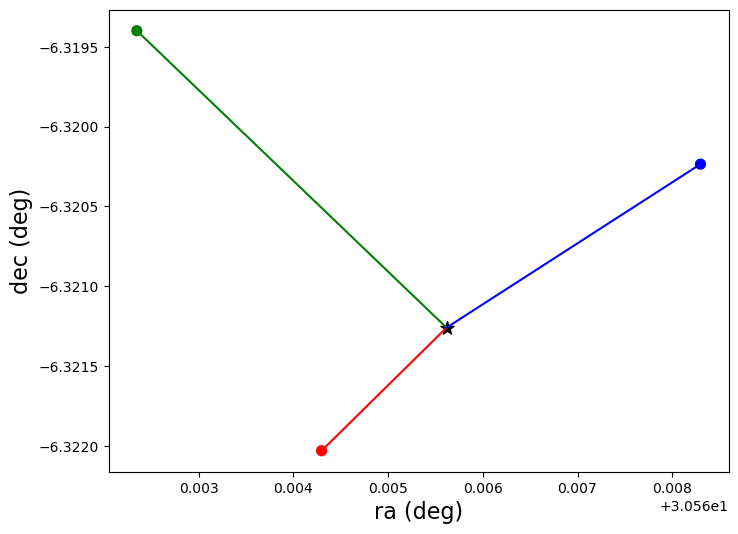
Plot the coordinates of the neighbours of any one test point. This exercise can help us visually inspect whether our neighbour search code gave us reasonable results or not.
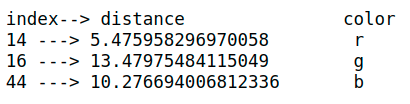
Along with plotting, also print the distances of each of these neighbours and visually confirm that the nearest looking object on the plot indeed has the smallest distance from the test point, and similarly check for other neighbour points.
I’m plotting the neighbours of \(15^{th}\) point from the catalog. And also printing their indices and distances to compare the stored distances by eye!
Point marked as \(\star\) is the \(15^{th}\) point. Other points are its neighbours.
[44]:
#converting list to arrays
coords=np.array(coords)

demoid = 15
#get coordinates of `demoid` object

#get neighbours of `demoid` object --> store it in a variable `neighbours`
#get coordinates of all the neighbours of `demoid` object

#Make scatter plot of demo point

#Make scatter plot of all the neighbour points on the same axis.

#pass x and y labels

# You're done! Do : plt.show()

#access distances of all the neighbours of `demoid` and store in a variable.
# print `index of each neighbour` ---> `its distance`

# Now visually compare the distances...does it make sense?
Using k-d tree algorithm to query the neighbour points within a given distance
time complexity ~ \(\mathcal{O}(n\log{}n)\)
We’ll use the spatial.cKDTree package from scipy.
If you have many points whose neighbors you want to find, you may save substantial amounts of time by putting them in a cKDTree and using functions defined on this tree. For example: query_ball_point
[48]:
from scipy import spatial
sin = np.sin
cos = np.cos
deg2rad = np.deg2rad
Exercise:
Write a code using cKDTree to find out the neighbours of a given
set1of objects (coordinates) from a catalog of otherset2objects.Write this code in a
class structurewhere it takes-in arrays ofra,decof the catalog objects (set2) andconverts (ra,dec) to (x,y,z) of cartesian coordinates,
creates k-d tree of the
set2catalog objects using (x,y,z),queries for the neighbour points of - each object in the
set1, and returns the indices inset2.
[49]:
class find_neighbours:
    def __init__(self, tra=None, tdec=None, r=1):
        """r==1 --> unit sphere calculations
        tra,tdec--> coordinates to create tree for."""

        self.tra = tra
        self.tdec= tdec
        self.r = r
        self.rad_to_arcsec = 180.0*3600./np.pi
        self.arcsec_to_rad = 1/self.rad_to_arcsec

        print(f"Initializing with sphere of radius, r={r}.")

    # write a function that converts ra,dec to cartesian components.
    def RA_DEC_to_xyz(self, ra,dec, units='deg'):
        """converts ra,dec to cartesian x,y,z components on a unit sphere"""
        if units=="deg":
            ra = deg2rad(ra)
            dec= deg2rad(dec)

        # fill the details to compute x,y,z coordinates

        return x,y,z

    # write a function `create_tree` uses arrays of tra,tdec
    # values as inputs and returns a cKDTree object into these coordinates.
    # use the below function -
    def create_tree(self):
        # fill the details to create an array of tuples of x,y,z from tra,tdec
        x,y,z = ??

        # make a tree using cKDTree method
        tree = spatial.cKDTree(np.c_[x,y,z])
        return tree

    # write a function that takes arrays of ra,dec coordinates
    # and returns the neighbour object's indices from the tree
    # within some distance `rmax` arcsec .
    # use the below function -
    def query_within_rmax(self, ra, dec, rmax=15, units="deg"):
        print(f"Searching for {ra.size} number of objects in the catalog with rmax={rmax} arcsec.")
        #convert rmax from arcsec to distance units
        rmax = 15 * ??

        #get x,y,z from ra,dec passed to this function.
        x,y,z = ??

        # copmute x,y,z of input objetcs
        cartesian_coords = np.c_[x,y,z]

        # make tree from catalog by calling function self.create_tree
        tree = ??

        # look for the neighbour objects
        ids_into_tree = tree.query_ball_point(cartesian_coords,rmax)

        return ids_into_tree
A sanity check
Testing conversion of (ra,dec) to (x,y,z)
[ ]:
# Here we are not passing `tra` and `tdec` while initialising the class `find_neighbours`
# So these variables take default values of `None`.
# We only want to test the coordinate conversion code `RA_DEC_to_xyz`. So it's ok to not
# pass `tra`,`tdec`!

code = find_neighbours()

# a look at the cartesian coordinates
x,y,z = code.RA_DEC_to_xyz(coords[:,0], coords[:,1])
cartesian_coords = np.c_[x,y,z]

print("shapes of x,y,z arrays:",x.shape,y.shape,z.shape)
print("shapes of (x,y,z) tuple array:", cartesian_coords.shape)
#field on objects looks close to equator
print(cartesian_coords)

Compare the output of our brute force algorithm with cKDTree algorithm on few Demo objects
Exercise:
Take the same bunch of objects for which we already have run our brute force search method,
feed them into the wrapper code of k-d tree written above,
find out their neighbour points within the same
rmax(default value)=15 arcsec.The neighbour objects found from both the methods should match!
[53]:
# Store some demo objects as per your choice
demo_ids = [15] #9,15
demo_ra =coords[demo_ids,0] #in degrees
demo_dec=coords[demo_ids,1] #in degrees

print("""I had chosen following indices from set2(catalog) as my test objects:""",demo_ids)
I had chosen following indices from set2(catalog) as my test objects: [15]
# Initialize class and set up the tree by passing it a catalog of objects.
[54]:
code_tree = find_neighbours(tra=coords[:,0], tdec=coords[:,1])
Initializing with sphere of radius, r=1.
# Query the neighbours of demo objects
[ ]:
idx=code_tree.query_within_rmax(demo_ra, demo_dec)
# Go back to brute force output and compare this result…. does it match?
[ ]:
idx
Compare the computer time required by our brute force algorithm vs the k-d tree algorithm
First let’s use k-d tree to query neighbours within rmax=15 arcsec for each object within the catalog.
[ ]:
%time idx = code_tree.query_within_rmax(coords[:,0], coords[:,1])
Reminder: full catalog has about 2,20,000 objects… and k-d tree found neighbours for each one of them in 1-2 seconds. (This time will vary depending on your computer’s capability.)
Now let’s use the brute force method only for 1000 objects.
[ ]:
%time nnids,distances = query_neighbour_points(coords[:1000],rmax=15, verbose=False)
Congratulations! Now you have learnt to -
use
cKDTreeto find out neighbours of a givenset1of objects into some otherset2of objects.count the number of neighbours of any given object in
set1.access the results of cKDTree and identify neighbours of each obejct in
set1into theset2.access the coordinates and distances of each neighbour of every point in
set1.